
Clock Faces
I’ve been designing clock faces since I was a kid. The problem of creating an attractive, legible, and original clock face is very appealing to me. Working with the standard circular face and two (or three) hands, this is a very constrained problem. Yet I’ve felt it was ripe for creative design and variation.
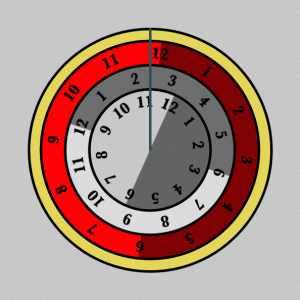
A great way to see new designs in action, and easily modify them, is to make them first on the computer. I’ve written programs to render my clock designs on almost every computer I’ve ever owned or used, from my original 128k black-and-white Mac, to the Blit at Bell Labs, to my TiVo, to my iPhone. Here’s a simple starting point written in Processing for my desktop: the “hands” are the gray line running from the center of the design to the top. In this design, the hands stay still, while the clock face rotates under them. The innermost ring reports the hours, the middle ring the minutes, and the outer ring the seconds. In this snapshot, it’s about 11:22:59. I like the idea of reversing the roles of what parts remain static and which parts move.
Of course, clocks can be much more abstract.
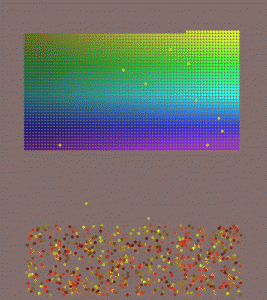
Here’s a one-hour clock, inspired by an hourglass. At the start of each hour, a grid of 3600 dots appears at the top of the screen: this gives us one dot for each second in the hour. The dots are multicolored to add some visual interest. Over time, the dots fall, starting in the upper-left and working right and down. One dot falls per second, but it takes each dot a few seconds to drift to the bottom the screen along a curvy, meandering path. Here we see 10 or 11 dots in motion. The dots end up at the bottom of the screen in a jumble. At the end of the hour, the dots fly back up into formation, and it all starts over again. This isn’t meant for telling the time exactly, but for just getting a visual estimate. You can eyeball how much of the grid is gone, or how many dots are at the bottom, or both, and work out about how far into the hour you are.
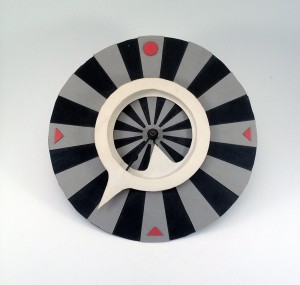
Of the hundreds (or thousands) of clock faces I’ve designed, I’ve probably made only a few dozen. I usually start with a AA battery-driven quartz mechanism, like those driving almost every wall clock made today. I cut my clock parts out of colored card or sheets of colored foam. The trickiest part is usually getting the new hands to connect up properly with the two little cylinders exposed by the quartz mechanism. In this clock, the outer minute hand points outward, while the minute hand points inward. Ideally, you wouldn’t perceive them as two separate objects; they’d appear as a single white band with two curved, pointy bits. The downside of making this clock in real life are that you can see a shadow between the two white pieces, and you can also see the thin, black arms connecting them to the center.
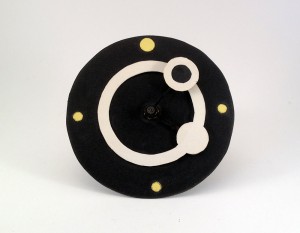
I like the simplicity of this design. The black face hides the rods connecting the hands to the center, so the white ring and the dots on top of it appear to be floating. The solid white disk indicates the hour, and the white ring with a block center indicates the minute. In my mind, the two hands would appear to be a single piece. But this time the physical limits on achieving that worked out in my favor, because I like seeing the minute hand floating over the hour hand like this. That the three small yellow circles are at 3, 6, and 9 o’clock. The topmost yellow circle is the largest: this marks 12 o’clock, so you hang the clock with this circle at the top.
I’ve got a huge number of clock faces in my archives, and I’m always adding to them. Some clocks really can’t be made out of physical materials, and they’re perfect candidates for computer implementation. If the day comes when we’re all wearing high-resolution displays on our wrists, I’ll be able to bring all my clock faces to life for daily use. But as much as I love digital implementations, they don’t carry quite the same reward that comes from making a real, physical clock, hanging it on the wall, and using it to tell time.