
Digital Weaving
Weaving is a fascinating topic. I first discovered digital weaving by a chance discovery. I owned an early version of a program called Painter which was designed for digital drawing and painting (fun fact: it was packaged in a metal paint can!). The author’s wife was a weaver, and he had written a digital loom for her,. Just for fun he snuck the program into Painter as an Easter egg. I don’t recall how I stumbled on it, but I was immediately hooked. Since the weaving program was just a prototype and undocumented, it was hard to use (and also somewhat buggy).
Later, I decided to study weaving. One nice result was The Weaving Equation, which summarizes the process of working from the instructions to the loom and creating a fabric. I wanted to actually design new patterns, so I built on Painter‘s weaving language and developed Andrew’s Weaving Language, or AWL. I wrote an interpreter for the language in C# and a program that would turn it into a fabric design. It was enough fun that I enhanced it with a full-blow interface (you can still use this program online! Just click here, or on the program’s screenshot to the right.
There’s a ton of documentation and examples; just click the Help button in the upper right corner.
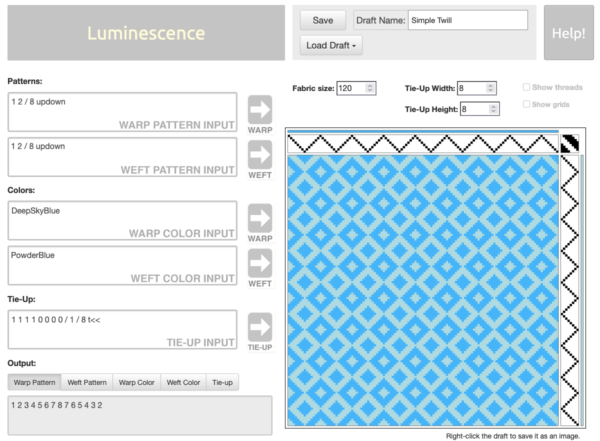
The three black and white checkerboards along the sides of the fabric preview are the actual instructions for how to weave a particular pattern (I include these in Luminescence). Unfortunately, for complicated patterns these would be time-consuming and tedious to enter, with tons of click-click-clicking on the checkerboards. And if your pattern is really big, that task would be overwhelming.
So I simplified things with AWL. Rather than draw the checkerboards, you type a little AWL program into the text boxes for the warp and weft patterns. Click the arrow to the right of those boxes to execute those instructions, which then automatically populates the checkerboards. You can also enter AWL expressions for the colors of the threads. Finally, you can enter an AWL expression for the tie-up, which is the little checkerboard in the corner where the warp and weft patterns meet. For complicated patterns the checkerboard cells can become tiny, and entering repeating patterns with only small variations is slow and error-prone. Writing a little AWL program to do it all for you is great!
Another great feature of creating your patterns with AWL is that you can write programs that produce patterns far more complicated than you’d ever want to enter by hand (or perhaps ever think of). I loved starting with a simple design, and then changing and adding to the AWL expressions to make it richer and more interesting.
I used Luminescence to make all of the examples below, which you could weave for real if you wanted. Many of these are my own designs, but some of them are recreations of classic patterns, which you can find documented in countless books and notes that people have passed on for generations. It’s fun to find AWL expressions for patterns in books, though you can always just type in explicit 0’s and 1’s if you prefer.
I wrote about my weaving language in three installments of my column for IEEE Computer Graphics & Applications. You can see all of them here (look for “Digital Weaving”). They also show the AWL expressions for many of the examples below.
To enlarge any image, or view gallery of all of them, just click on a swatch.


